[Windows Forms] Automatically drag and drop controls (DragMove)
Here’s a piece of code I wrote a while ago, I just thought it could be useful for WinForms developers…
In WPF, there is a very handy method to move a window with no borders : Window.DragMove. It can be used like that :
private void Window_MouseDown(object sender, MouseButtonEventArgs e)
{
    this.DragMove();
}
When you call this method, the window is moved with the mouse until the button is released. It could hardly be simpler ;)
Unfortunately, this method only exists in WPF, and a majority of developers are still working with Windows Forms. So I came up with a solution to use a similar technique in Windows Forms, with a few improvements :
- Usable on any control, not only a window
- No need to explicitly handle the
MouseDownevent - Form designer integration, using a
IExtenderProvider
My solution consists of the following items :
- a static
DragMoveExtensionsclass which provides extension methods for theControlclass (easily convertible to regular static methods for use with C# 2) - a
DragMoveProvidercomponent, which implementsIExtenderProviderto add a newEnableDragMoveproperty to controls
There are several ways to use this solution, pick the one that best suits your needs :
-
The simplest, which requires no coding at all : in design mode, drop a
DragMoveProvideron the Form, and set theEnableDragMoveproperty totrueon the Form or control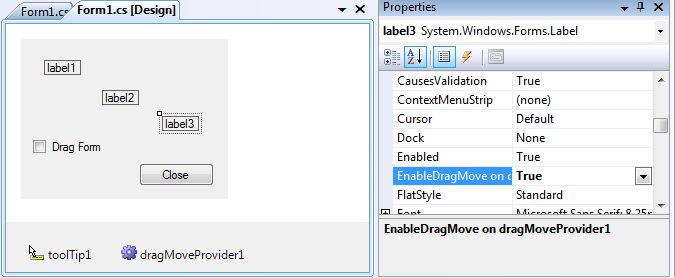
-
The closest to WPF’s DragMove : in the handler of the
MouseDownevent, call theDragMoveextension method on the Form or control to move
private void label2_MouseDown(object sender, MouseEventArgs e)
{
    label2.DragMove();
}
- The most flexible : call the
EnableDragMoveextension method on the Form or control to move (no event handling needed).
private void checkBox1_CheckedChanged(object sender, EventArgs e)
{
    this.EnableDragMove(checkBox1.Checked);
}
The attached Visual Studio solution contains the WinFormsDragMove library, and a test project to demonstrate the various ways to use this library. A C#2-compatible version of these projects is also included.